
We independently score every service with our Experience Index. We may earn a commission if you subscribe through links on this page — it never affects our scores or picks.
Remote and hybrid work put a different set of demands on a VPN than binge-watching does. You are on café and co-working Wi-Fi you cannot vouch for, you may be juggling a corporate VPN alongside a personal one, and you need a connection that stays up and stays private through a full workday — not one that drops mid-call. This guide weighs VPNs on the criteria that actually matter for work: split tunneling, an always-on kill switch, stable connections, a dedicated IP for corporate allowlists, malware blocking, wide server coverage, and enough device slots for a laptop, phone, and tablet. Two providers do it best, with a couple of well-known names included as honest reference points.
What actually matters in a work VPN
Streaming benchmarks are the wrong yardstick for work. The features that earn their keep from nine to five are less glamorous:
- Split tunneling — route only the traffic that needs protecting through the VPN, and let a video call or a local network printer bypass it. This is also how a personal VPN coexists with a corporate one without the two fighting over the same packets.
- Always-on plus a kill switch — the kill switch blocks all traffic if the VPN connection drops, so a momentary reconnect can never silently leak work data over an open café network. Always-on keeps you protected without having to remember to connect.
- Stable, long-lived connections — a work VPN has to survive a full day of calls, uploads, and idle periods without nagging reconnects. Flaky tunnels are worse than no VPN because they interrupt your flow.
- A dedicated (static) IP — an address assigned only to you, so your company can allowlist it for access to internal tools. A shared VPN IP changes and can be blocked; a dedicated one stays put.
- Malware and tracker blocking — DNS-level blocking (Proton's NetShield, NordVPN's Threat Protection) adds a layer of defense against sketchy links, which matters more when you are handling work accounts.
- Wide server coverage and multi-device — for travel days you want a nearby server wherever you land, and enough device slots (10 covers a laptop, phone, and tablet with room to spare).
Weigh those, and two providers rise to the top.
Proton VPN — best for privacy-first remote work
Proton VPN — Experience Index
7.1 / 10 composite
Updated Aug 21, 2026
| Dimension | Score | Consensus | Basis |
|---|---|---|---|
| Exit Ease | Moderate consensus | Official cancel page disables auto-renew immediately (clear, multi-platform) but refunds are prorated/unused-portion only and gated behind a manual support ticket; experts call cancellation frictionless yet refund proactive/manual; Trustpilot ~2.1-2.2/5 with recurring refund-denial/billing complaints. | |
| Price Stability | Moderate consensus | Tracked 2-year VPN Plus monthly-equivalent stepped up once across the tracked window, rising 16.7% to $3.49/mo as observed 2026-08-20; the same capture shows the 1-year term at $4.49/mo and month-to-month at $9.99/mo. Proton still discloses renewal inline on its own pricing page ("renews at $83.88 every 12 months" for Plus) alongside a 30-day money-back guarantee, so the structural issue remains the intro-to-renewal step rather than mid-term hikes on existing subscribers. Experts praise the upfront renewal disclosure while flagging the intro-vs-renewal gap and long-term plans above competitors; community (Trustpilot/YouTube) reports auto-renewal surprise charges and refund friction. | |
| Account Sharing | Moderate consensus | Official Proton pages and support docs confirm 10 simultaneous devices on paid plans (1 on free) and a Family plan of up to 6 separate accounts, each with 10 VPN connections, with no published anti-sharing enforcement; allowlisted reviews (Tom's Guide, TechRadar) corroborate the 10-device limit as generous but below unlimited-connection rivals; community signal (Trustpilot plus a 66-vote feature request) is thin and mixed, wanting lightweight in-account multi-user sharing. | |
| Multi-Device | Moderate consensus | Official docs confirm 10 simultaneous devices (1 on Free) plus unlimited router devices and very broad native-app coverage; allowlisted experts (Tom's Guide Apr 2026, TechRadar 2025, PCMag) confirm 10 connections and consistent, near-feature-parity apps across Windows/Mac/Linux/iOS/Android/TV; community (Trustpilot ~4.5, app stores 4.6-4.7) is positive on cross-device app experience with minor gripes about the 10-cap and support. | |
| Customer Support | High consensus | Official pages confirm 24/7 paid-only live chat, a deep Help Center, email and Zendesk ticketing, and no consumer phone; TechRadar (email <12h, chat ~9am-midnight CET) and Tom's Guide (extensive but technical docs, website-only/paid-only chat, slow-response complaints) corroborate; Trustpilot ~4.5/5 with recurring mixed support sentiment (helpful but slow). |
Proton VPN is the pick when the sensitivity of your work — or your own principles — put privacy first. It is Swiss-based, its apps are open-source, and it has commissioned independent third-party audits, so its privacy claims are inspectable rather than asserted. That pedigree matters when you are moving work data across networks you do not control.
On the work checklist, Proton delivers: split tunneling to keep work and personal (or corporate-VPN) traffic cleanly separated, an always-on option with a kill switch so a dropped tunnel never leaks, and NetShield for DNS-level ad, tracker, and malware blocking. Its standout is Secure Core — multi-hop routing that passes your traffic through hardened servers in privacy-friendly countries before it exits, raising the bar against network-based deanonymization if your threat model calls for it. You get 10 simultaneous devices, and Proton runs a large total server fleet so an uncongested nearby server is easy to find on the road.
Proton's renewal curve is the flattest among mainstream VPNs, but it is not flat: Plus is $9.99/mo month-to-month, roughly $3.99/mo on a 1-year term, or about $2.99/mo on 2 years, with the 1- and 2-year rates both renewing to roughly $6.99/mo — still the gentlest rise in the category (see which VPNs have the worst renewal pricing; US pricing as of July 2026 — confirm before subscribing). There is also a free tier if you want to test the apps first, though it is limited to one device and is better suited to light browsing than a full work setup.
Get Proton VPNNordVPN — best for speed and a dedicated IP
NordVPN — Experience Index
6.0 / 10 composite
Updated Jul 5, 2026
| Dimension | Score | Consensus | Basis |
|---|---|---|---|
| Exit Ease | Moderate consensus | 30-day money-back guarantee on new subs only (renewals excluded); refunds via 24/7 live chat with self-serve refund button, processed in ~4h and paid in up to 10 business days; app-store/reseller buys excluded; auto-renew is opt-out by default and the subject of multiple 2024-2026 class-action lawsuits alleging buried cancellation, inadequate renewal notice, and dark patterns, with some users reporting refund push-back. | |
| Price Stability | High consensus | Intro discounts apply to first term only; renewal auto-charges at ~3x the intro monthly rate (Tom's Guide cites 287.63% increase, prices 'more than double'); auto-renewal on by default and disclosed but exact renewal figures buried on a separate legal page; renewals excluded from the 30-day refund; recurring Trustpilot/forum complaints of surprise renewal charges and two class-action suits (Aug 2024, May 2025) over auto-renewal practices. | |
| Account Sharing | High consensus | NordVPN allows 10 simultaneous connections per account on every plan, explicitly permits account sharing within families/household, supports unlimited devices via one router slot, and offers Meshnet to link up to 60 devices; experts call 10 reasonable but note rivals (Surfshark, PIA) offer unlimited; community is broadly positive on multi-device use though gripes center on billing not sharing. | |
| Multi-Device | High consensus | 10 simultaneous connections on one account; apps for Windows/macOS/Linux/iOS/Android plus browser extensions, routers (whole-network = 1 slot), smart TVs (Android TV/Fire TV/Chromecast) and consoles; Meshnet links up to 60 devices; limits are max 5 devices per single server and a 'Session Limit Reached' error past 10, with TechRadar flagging inconsistent feature parity across platforms and Trustpilot users citing frequent re-auth when switching devices. | |
| Customer Support | Moderate consensus | 24/7 live chat connects to a human in under ~1 minute (TechRadar/Tom's Guide/Engadget) plus 24-hour email and a searchable help center that Engadget flags as poorly organized/self-contradictory; community is mixed (Trustpilot ~4.1-4.2/5 over ~46k reviews calling support "very fast and helpful" but recurring auto-renewal/refund-delay complaints). |
NordVPN is the pick when speed and stability lead, or when your company allowlists specific IP addresses. Its NordLynx protocol (built on WireGuard) keeps overhead low, so connections stay fast and hold up through long sessions and on distant servers — exactly what a full workday of calls and uploads demands. It covers more distinct city locations than most rivals, so travel days rarely leave you far from a low-latency server, and it includes Threat Protection for DNS-level ad, tracker, and malware blocking.
Its work-defining feature is the optional dedicated IP — a static address assigned only to you, available as a paid add-on. If your employer allowlists IPs for access to internal tools, a VPN gateway, or an admin panel, this is the feature that lets you connect from a constant, allowlist-friendly address instead of a rotating shared one. NordVPN also supports split tunneling and an always-on kill switch, and covers 10 devices.
Pricing runs $12.99/mo month-to-month or roughly $3.49/mo on the 2-year Basic plan, with the Complete tier around $4.49/mo (higher tiers more). Those are introductory rates that renew higher, and they can shift around seasonal sales (US pricing as of July 2026 — confirm before subscribing). There is no free tier, but a 30-day money-back guarantee lets you test stability on the servers you actually use.
Get NordVPN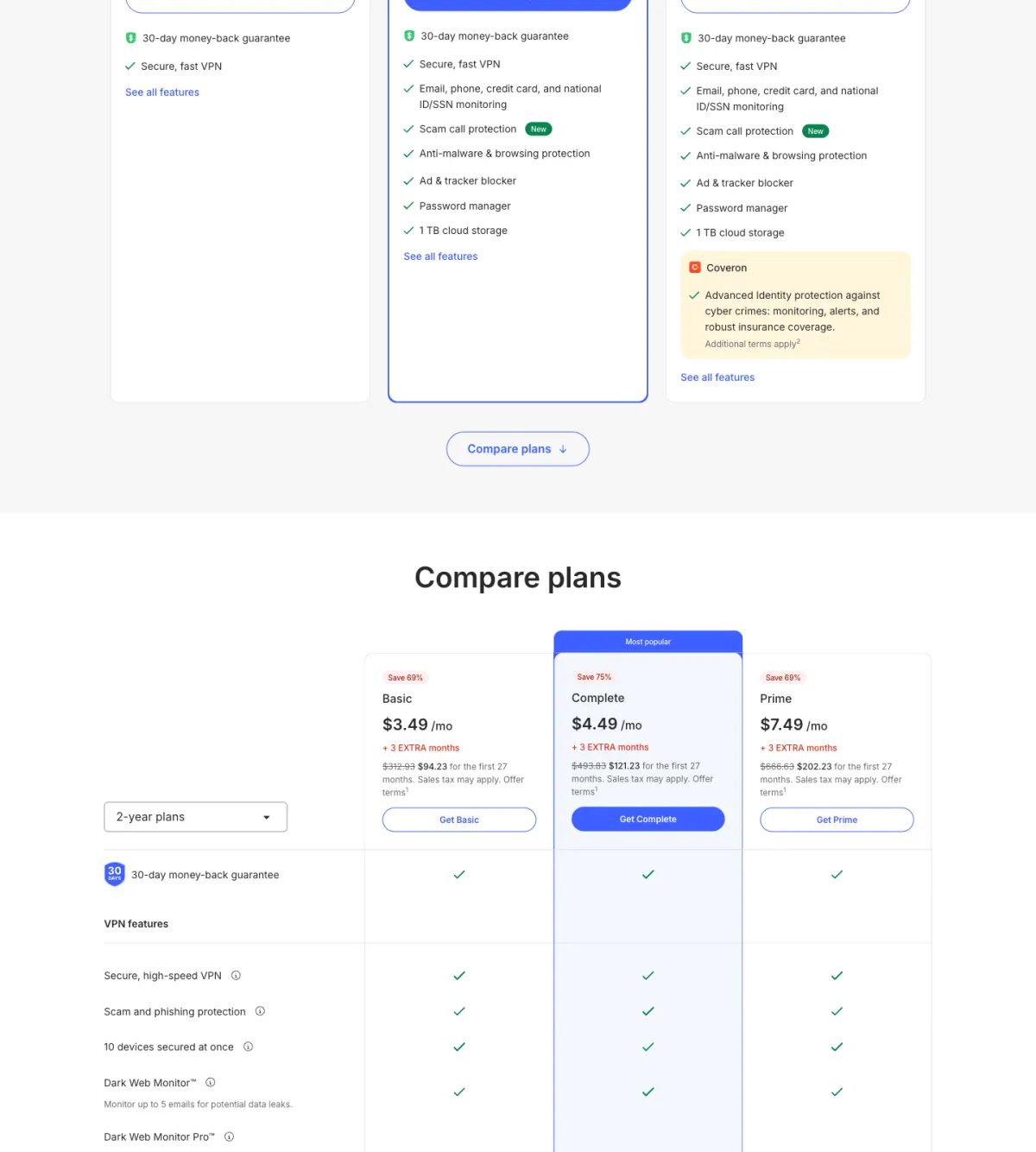
How the work VPNs compare
| Service | Split tunneling | Kill switch / always-on | Dedicated IP | Malware blocking | Devices | Best long-term rate |
|---|---|---|---|---|---|---|
| Proton VPN | Yes | Yes | No | NetShield | 10 | 2-yr ~$2.99/mo (Plus; renews ~$6.99/mo) |
| NordVPN | Yes | Yes | Yes (paid add-on) | Threat Protection | 10 | 2-yr Basic ~$3.49/mo (intro) |
| ExpressVPN | Yes | Yes | Pro tier only | Yes | 10–14 (by tier) | 2-yr Basic ~$2.49/mo (intro, editorial; higher tiers more) |
| Surfshark | Yes | Yes | Optional | CleanWeb | Unlimited | ~$2.49/mo (intro, editorial) |
ExpressVPN and Surfshark are here as honest reference points rather than picks we monetize. ExpressVPN has slick cross-platform apps and its fast Lightway protocol, and Surfshark stands out for unlimited simultaneous devices — genuinely useful if you run a lot of hardware — but neither is an affiliate partner, so we are not recommending them over the two above; we simply want you to see where the field sits. Note that every long-term rate in this field renews higher — Nord's intro pricing more steeply, Proton more gently (its 2-year rate renews to roughly $6.99/mo) — so factor renewals, not just intro rates, into the real long-term math.
Do you need a personal VPN if work provides one?
Often, yes — because they do different jobs. A corporate VPN connects you to your employer's internal network and is controlled by their IT team; it exists to protect their resources, not your personal privacy. A personal VPN protects your traffic — banking, personal email, browsing — on untrusted networks, and keeps it private from whoever runs the Wi-Fi. Split tunneling is what lets the two coexist peacefully: route work apps through the corporate tunnel and everything else through your personal VPN, so neither interferes with the other. If you regularly work from cafés, co-working spaces, or hotels while traveling, a personal VPN is worth having alongside — not instead of — the one work gives you.
Pros
- Both Proton VPN and NordVPN nail the core work features: split tunneling, an always-on kill switch, and 10 devices.
- Proton adds the strongest privacy pedigree (Swiss, open-source, audited) plus Secure Core multi-hop for sensitive work.
- NordVPN adds an optional dedicated IP — the feature to buy if your company allowlists addresses — and often the fastest connections.
- Long-term pricing is strong on both (~$2.99/mo Proton renewing to ~$6.99/mo, ~$3.49/mo NordVPN intro over 2 years).
Cons
- Proton VPN has no dedicated-IP option, so it is the weaker fit for a strict corporate IP allowlist.
- NordVPN's long-term rates are introductory and renew higher, and can shift around seasonal sales; Proton's 2-year rate also renews (to ~$6.99/mo), just more gently.
- Neither free option is a real work setup — Proton free is one device only; NordVPN has no free tier.
- A dedicated IP is a paid add-on, so budget for it if your employer requires allowlisting.
Frequently asked questions
What is the best VPN for remote work in 2026?
Do I need a personal VPN if my company already gives me one?
What is split tunneling and why does it matter for remote work?
What is a dedicated IP and do I need one for work?
Should I keep my VPN always on while working?
Setting up your work-from-anywhere kit? Read our honest take in is Proton VPN worth it, compare the full field in the best VPNs in 2026, and if travel days are a big part of the job, see the best VPN for travel. To round out the rest of your setup, start with our hub, the best privacy subscriptions in 2026.