We independently score every service with our Experience Index. We may earn a commission if you subscribe through links on this page — it never affects our scores or picks.
A new school year means a pile of new logins — school portals, learning apps, shared streaming, the family tablet. If everyone in the house is reusing the same three passwords (or texting them around), you're one breach away from a bad week. A family password manager fixes that with per-member accounts, shared vaults, and admin controls, and it's one of the cheapest security upgrades a household can make. This guide covers the picks with real family plans and how to set kids up the right way.
What makes a password manager good for families?
A family plan is more than a bulk discount. The three things that matter are per-member accounts (everyone gets their own private, encrypted vault, not one shared login), shared vaults (a separate space for the credentials the whole house uses — Wi-Fi, streaming, a shared card), and an admin panel (one parent can add or remove members and control billing). Zero-knowledge encryption ties it together: the vault is encrypted on your devices, so the provider can't read your shared passwords even if it wanted to.
For a back-to-school setup, the practical workflow is: put family-wide logins (streaming, home Wi-Fi, the shared family email) in a shared vault everyone can reach; keep bank and card logins in an adult-only vault; and give each child a member account with access to only the vaults they need. That separation is what lets you teach password hygiene without exposing your finances.
Family plans compared
| Service | Price | Users | Shared vaults | Admin panel | Best for |
|---|---|---|---|---|---|
| Proton Pass Family | $4.99/mo billed yearly ($59.88/yr) | Up to 6 | Yes — end-to-end encrypted vault + link sharing | Yes | Value + privacy-first households |
| 1Password Families | ~$5.99/mo (editorial) | Up to 5 | Yes — most polished sharing UX | Yes | Smoothest overall family experience |
| NordPass Family | Family plan available (check current pricing) | Family plan | Yes | Yes | Nord-ecosystem households on a budget |
| Bitwarden | Free; Premium ~$1.65/mo (editorial) | Free + low-cost family plan | Yes | Yes | Best free / open-source option |
Proton Pass Family — best value
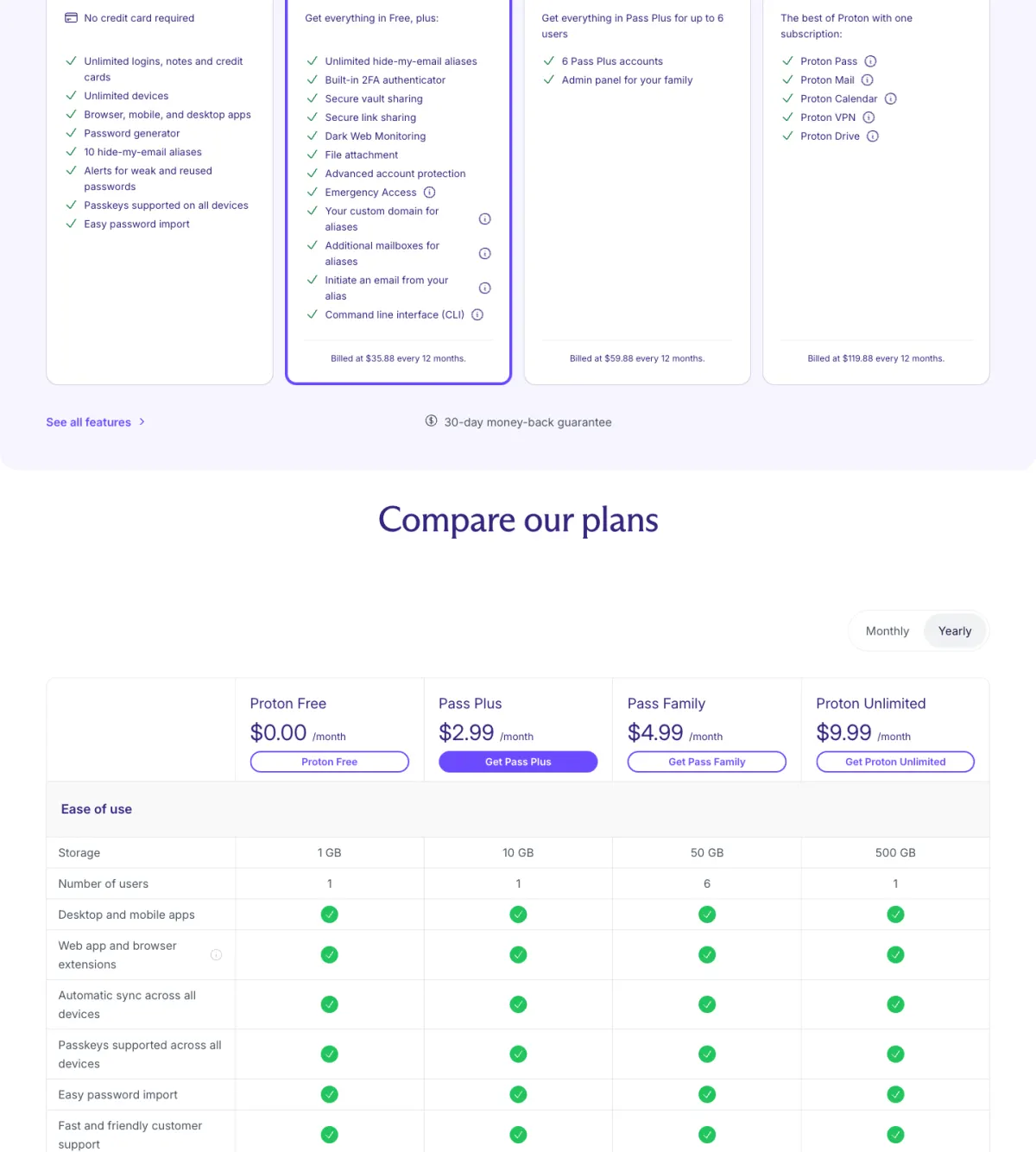
Proton Pass Family is the standout for most households on price and privacy. It runs $4.99/month billed yearly ($59.88/year) for up to 6 users (US pricing as of July 2026 — confirm before subscribing), which is genuinely six full Pass Plus accounts plus an admin panel that gives one parent sole control over billing and the ability to add or remove family members at any time. If your standalone Pass Plus reference point matters, that plan is $2.99/month billed yearly on its own — so the family plan buys five more seats for two dollars more.
On the security side, Proton Pass is open-source and independently audited, with end-to-end, zero-knowledge encryption — Proton itself can't read your vault — and it operates under Swiss privacy law, overseen by the non-profit Proton Foundation. For sharing, Pass Plus (which every family member gets) includes secure vault sharing and secure link sharing, so you can hand a specific login to a family member — or generate an encrypted, expiring link — without exposing the rest of your vault. The free tier is also unusually generous if you want to test first: unlimited logins across unlimited devices and 10 hide-my-email aliases.
The honest trade-offs: Proton Pass is newer than 1Password with a smaller third-party ecosystem, autofill isn't always perfectly smooth on every platform, and support is a documented weak spot — there's no live chat, just a contact form and knowledge base. For a family that values privacy and value over white-glove support, it's the pick.
Check current Proton Pass Family plansNordPass — budget pick with a family plan
NordPass, from the team behind NordVPN, is one of the cheapest mainstream managers, and it offers a family plan worth a look if you're already in the Nord ecosystem. Its individual Premium tier runs about $1.49/month on a two-year term (US pricing as of July 2026 — renews higher, confirm before subscribing), which anchors it as a budget option. The family price wasn't verified for this guide, so check the current family pricing on NordPass's site before you commit.
Security is sound: NordPass uses XChaCha20 encryption with a zero-knowledge design (encrypted on-device, NordPass can't read your vault), built by Nord Security, with a data-breach scanner, passkey support, and autofill. The app is clean and modern. Its standout trait is price rather than feature depth — its ecosystem is younger and smaller than 1Password's — but for a household that wants a capable manager on the cheap, and especially one that already subscribes to NordVPN, it's a reasonable family choice. Note the free tier allows only one active device at a time, so treat it as a trial, not a long-term family option.
Check current NordPass family plans1Password Families and Bitwarden — the honest alternatives
1Password Families is the most polished family experience in the category, at about $5.99/month for up to 5 people (editorial estimate; US pricing as of July 2026 — confirm before subscribing). Its shared-vault and member-management UX is the smoothest of any manager, and extras like Travel Mode (hide vaults at border crossings) and Watchtower (flag weak, reused, or breached passwords) are genuinely useful for a household. The catch: it covers five people rather than six, costs a bit more than Proton, and has no free tier beyond a 14-day trial.
Bitwarden is the best free and open-source option, and the right pick if cost is your top concern. Its free tier covers unlimited items across unlimited devices — rare generosity — it's independently audited, and Premium is about $1.65/month (editorial estimate; US pricing as of July 2026 — confirm before subscribing). It also offers a low-cost families plan. The apps are functional rather than fancy, and support is slower than paid rivals, but for a budget-minded, privacy-conscious household it's hard to argue with the value.
Neither of these carries a direct checkout link here — we only link services we monetize honestly — but both are worth weighing. See our 1Password vs Bitwarden comparison for the head-to-head.
Setting up kids and teaching password hygiene
Registry Experience Scores below are computed measures of the real-world experience from documented evidence — not a spec sheet.
Proton Pass — Experience Index
7.2 / 10 composite
Updated Jul 5, 2026
| Dimension | Score | Consensus | Basis |
|---|---|---|---|
| Exit Ease | Moderate consensus | Exit Ease rated 7/10 (moderate consensus): Self-serve cancel in Settings > Subscription; plan runs to end of billing period and does not renew; downgrades convert unused time to prorated account credits. | |
| Price Stability | Moderate consensus | Price Stability rated 8/10 (moderate consensus): Standard list prices (Pass Plus $2.99/mo billed yearly; Family $4.99/mo billed yearly) renew at the published list rate; the only sub-list rate is a labelled $1 intro promo, not a decaying teaser. | |
| Account Sharing | Moderate consensus | Account Sharing rated 8/10 (moderate consensus): Pass Family covers up to 6 users with an admin panel; Pass Plus adds secure vault sharing and secure link sharing (encrypted, expiring, revocable links). | |
| Multi-Device | Moderate consensus | Multi-Device rated 7/10 (moderate consensus): Apps for Windows, macOS, Linux, iOS, Android plus Firefox/Chrome/Brave/Edge/Safari extensions; unlimited devices even on the free tier; cross-device sync. | |
| Customer Support | Moderate consensus | Customer Support rated 4/10 (moderate consensus): Support via knowledge base and a contact form; no advertised live chat or phone line. |
NordPass — Experience Index
6.3 / 10 composite
Updated Jul 5, 2026
| Dimension | Score | Consensus | Basis |
|---|---|---|---|
| Exit Ease | High consensus | Official 30-day refund (initial purchase only; cancel does not auto-refund, must contact support); Tom's Guide cites 30-day trial+refund while TechRadar reports class-action suits over Nord Security 'difficult to cancel' auto-renewals; Trustpilot shows recurring refund-denial and form+email cancellation complaints with some positive support resolutions. | |
| Price Stability | High consensus | NordPass uses deep multi-year intro pricing (~$1.38-1.49/mo) vs a ~$2.99/mo base, with renewal disclosed only at checkout ("The renewal price is $35.88/year") rather than on the pricing page itself; experts rate value strongly (TechRadar 4.5/5 updated Jul 2025; Tom's Guide notes price actually dropped since prior review) while Trustpilot/community recurringly warn to disable auto-renew because renewal exceeds the introductory price. | |
| Account Sharing | High consensus | Official: Family = 6 separate Premium vaults (1 owner + 5 invites), each private, plus item-level sharing/Emergency Access/3GB per user, while Free is capped at 1 active device; experts (Tom's Guide, TechRadar) confirm the 6-account bundle with full Premium per member; community (Trustpilot, YouTube) is positive on family value but recurringly notes there is no shared folder so each item must be shared/accepted individually. | |
| Multi-Device | High consensus | Official plans/FAQ confirm Free=auto-sync but one active device, Premium/Family=unlimited simultaneous logins across iOS/Android/Win/macOS/Linux/web+5 browsers; TechRadar and Tom's Guide confirm fast cross-platform sync and removal of old 6-device cap; Trustpilot/Reddit show mixed sentiment with recurring PC-to-phone sync-failure and no-force-sync complaints. | |
| Customer Support | High consensus | NordPass officially offers 24/7 live chat + email and a deep help center but no phone; TechRadar (Jul 2025) and Tom's Guide confirm prompt chat/email support, while Trustpilot (~4.0, ~2K reviews) shows mixed sentiment with praise for fast resolution but recurring complaints of inconsistent agents, delays, bot friction, and refund difficulties. |
The back-to-school setup is a teaching opportunity. Create a member account for each child, then share only the vaults they need — the school portal, streaming, the shared tablet — while your bank and card logins stay in an adult-only vault they can't see. Walk each kid through the password generator so they stop reusing "the dog's name plus 1," turn on the built-in breach/dark-web alerts so they learn to react when a login is exposed, and show them how autofill means they never actually have to type — or remember — a strong password again. Done once, at the start of the year, it sticks.
Pros
- Proton Pass Family: six seats, admin panel, end-to-end encrypted sharing, open-source and audited — the best value.
- 1Password Families: the most polished shared-vault and member-management experience, with Travel Mode and Watchtower.
- NordPass: budget-friendly, clean app, XChaCha20 zero-knowledge security, with a family plan for Nord households.
- Bitwarden: best free and open-source option, unlimited devices even on the free tier.
Cons
- Proton Pass: newer, smaller ecosystem, and weak support (no live chat).
- NordPass: family price unverified here (check current pricing); free tier is one device at a time.
- 1Password: covers only 5 people, no free tier, and costs a little more.
- Every plan: your admin's master password is the single point the whole household must never lose.
Frequently asked questions
What is the best password manager for families in 2026?
How do shared family vaults work?
Is Proton Pass Family worth it?
How do I set up a kid with a password manager?
For the wider field, see our best password managers guide and is NordPass worth it. If you're weighing the cheap-versus-polished trade-off, read NordPass vs 1Password, compare our two live picks head-to-head in NordPass vs Proton Pass, and for the best free option start with 1Password vs Bitwarden.