We independently score every service with our Experience Index. We may earn a commission if you subscribe through links on this page — it never affects our scores or picks.
Built-in browser managers occupy an awkward middle. They are unquestionably better than the alternatives most people would otherwise use — a reused password, a notes file, a sticky note on the monitor. But "better than the worst habit" is a low bar, and it is not the same as "safe for your most important accounts." The distinction hinges almost entirely on one scenario: what happens when malware is running on your device.
How a browser vault actually protects your passwords
The mechanics are the whole story here, so it is worth being precise. As documented in 2026 coverage, Chrome and Edge do encrypt the passwords they store — the file on disk is not plaintext. The problem is where the decryption key lives. Those browsers tie the key to your operating-system login, so that when you are logged in to your computer, the browser can unlock the vault automatically with no further prompt. That is the feature: no master password to type, autofill just works.
It is also the weakness. Because the unlock is automatic and tied to your OS session, any program running under your account while you are logged in can ask the operating system to perform that same unlock. Security researchers report that this is exactly the trust boundary infostealer malware targets: it does not need to crack encryption or guess a master password, because there is no master password in the way. If the malware is on the machine, it can request the unlock the browser was designed to grant, and copy the vault.
The infostealer problem, and what App-Bound Encryption did (and did not) fix
This is not hypothetical. As documented in 2026 coverage, a category of malware called infostealers is built specifically to harvest saved credentials from browsers the instant a device is infected — often bundled into pirated software, fake installers, or malicious browser extensions. Google responded: Chrome 127, released in 2024, added App-Bound Encryption, which ties the vault key more tightly to the Chrome process so that arbitrary programs cannot trivially request the unlock. It genuinely raised the bar.
It did not end the problem. As documented in 2026 coverage, several infostealer malware families have bypassed App-Bound Encryption, and the technique keeps circulating. The scale is the sobering part: security researchers report an aggregate of 16+ billion stolen credentials — usernames, passwords, cookies, and tokens — circulating from infostealer campaigns. That figure is an accumulation of many separate leaks and stealer logs over time, not a single catastrophic breach, and it is worth stating plainly so no one mistakes it for one event. But the direction is clear: the browser vault is a primary target, and its defenses are contested ground.
The attacker does not crack the encryption. The browser vault is built to unlock itself for you — malware just asks it to unlock for them instead.
Session cookies: the part that makes 2FA fragile
There is a second theft that rarely gets mentioned and matters as much as the passwords. When an infostealer runs, it does not stop at saved passwords. As documented in 2026 coverage, the same malware grabs session cookies — the tokens your browser holds after you log in — across Chrome, Edge, and Firefox alike. A stolen session cookie represents an already-authenticated session, so an attacker who imports it can sometimes resume your logged-in session directly, sidestepping the two-factor prompt you already cleared.
That is why "but I have 2FA on" is not the full answer people assume. Two-factor authentication protects the login step; a stolen live session cookie can land the attacker past that step on an account you already opened. It does not defeat 2FA in the abstract, but it can route around it in practice. The takeaway is not that 2FA is pointless — keep it on everywhere — but that credential theft in 2026 is about more than passwords, and any vault that leaks alongside your cookies compounds the damage.
Where dedicated managers draw a stronger line
The architectural difference is the reason a dedicated manager is safer, and it comes down to where the key lives. NordPass and Proton Pass use zero-knowledge, local encryption: the key that decrypts your vault is derived from a master password or secret that never leaves your device and is never known to the provider. There is no operating-system-level automatic unlock for local malware to piggyback on — decryption requires the secret only you hold. That is a meaningfully stronger trust boundary than a vault the OS unlocks for anyone in your session.
Two more gaps are worth naming, because they are about resilience, not just encryption. Dedicated managers add breach and dark-web monitoring, alerting you when a saved login turns up in a leak so you can rotate it before it is abused. And they offer stronger cross-platform sync across browsers, phones, and desktops from one vault, where a browser manager largely keeps you inside its own ecosystem. None of this makes a dedicated manager immune — a compromised device with a keylogger is dangerous regardless — but the concentrated, walk-up-and-copy exposure of the browser vault is exactly what the dedicated model removes.
| Built-in browser vault | Dedicated manager (NordPass / Proton Pass) | |
|---|---|---|
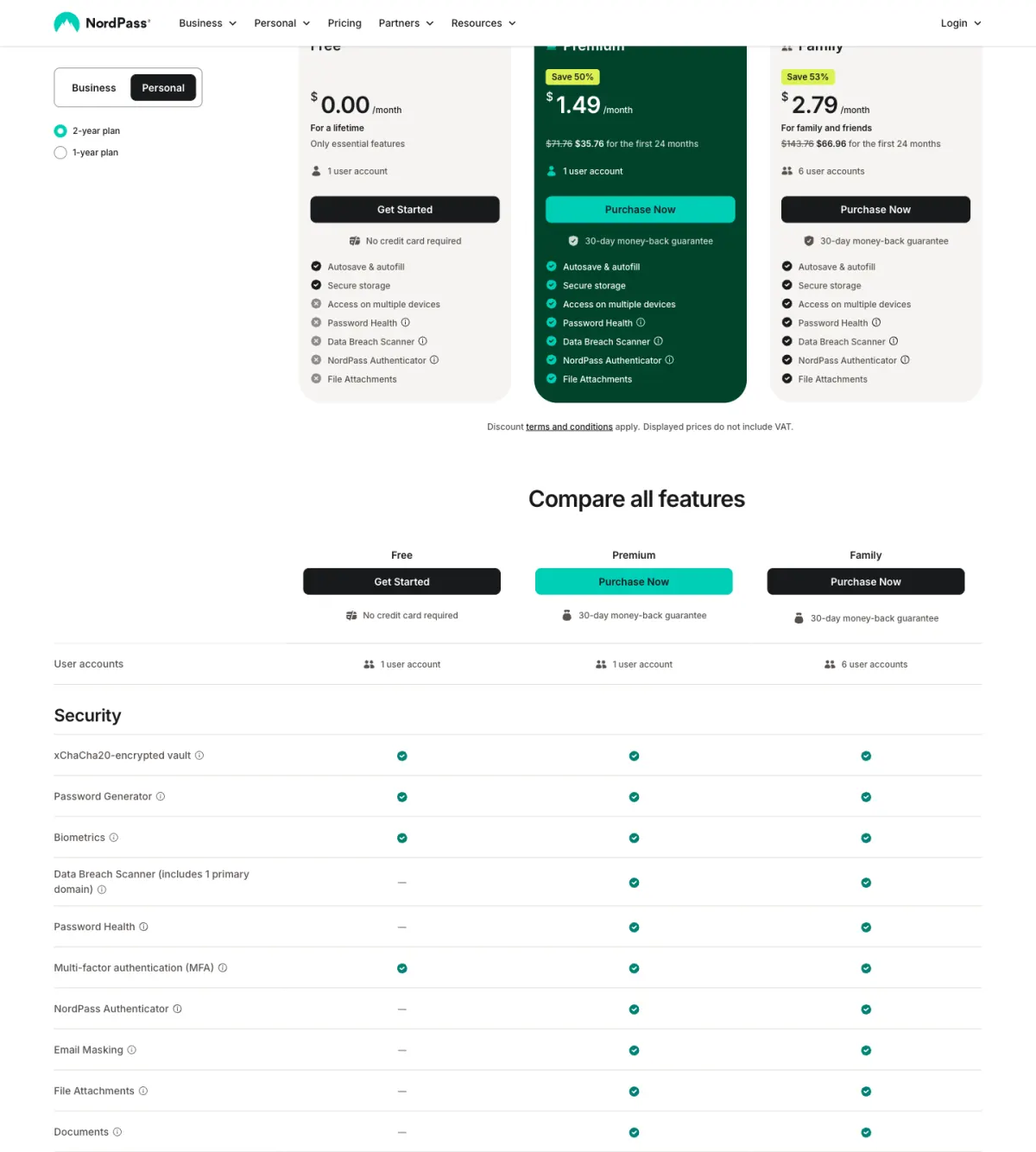
| Cost | Free | Free tier; paid around $1.49–$1.99/mo (2-yr) |
| Where the key lives | Unlocked by your OS login | Zero-knowledge, local; provider cannot read it |
| Local-malware exposure | Vault can be unlocked without a master password | Requires the secret only you hold |
| Breach / dark-web monitoring | Generally none | Yes |
| Cross-platform sync | Mostly within its own ecosystem | Across browsers, phones, desktops |
So, is the free browser vault ever the right call?
Yes — and refusing to say so would be dishonest. On a device you keep clean, for logins that would cost you little if leaked (a forum account, a newsletter, a throwaway signup), the browser vault is a perfectly reasonable free tool. It beats reuse, it beats a notes file, and its autofill actively discourages the worst habit of all: typing the same password into everything. The exposure this guide describes is concentrated in one scenario — a compromised device — and if that never happens, the vault holds up fine.
The proportionate move is not "delete your browser vault in a panic." It is to sort your accounts by what they protect. Keep the low-stakes logins wherever is convenient. Move the accounts that hold money, identity, or the keys to other accounts — email above all, since it resets everything else — into a dedicated zero-knowledge manager, and turn on its breach monitoring. That is a targeted upgrade of your riskiest eggs, not a wholesale migration you will abandon halfway.
Pros
- Free, built in, and already there — no setup, no subscription.
- Genuinely better than password reuse or a notes file for low-risk logins.
- Autofill works seamlessly inside the browser you already use.
- Fine on a device you keep clean and patched.
Cons
- The vault key is unlocked by your OS login, so local malware can read it with no master password.
- App-Bound Encryption raised the bar but has been bypassed by infostealers in 2026.
- Saved cookies are stolen alongside passwords, which can enable two-factor bypass on live sessions.
- No breach monitoring and weak cross-platform sync compared with a dedicated manager.
If you decide to make that move, both leading dedicated options carry free tiers to start with: check current NordPass plans or check current Proton Pass plans . To pick between them and the rest of the field, start with the best password manager and read the head-to-head in NordPass vs Proton Pass; if you are not yet sure you need a dedicated one at all, the companion piece do you need a password manager in 2026? walks through who genuinely does and who does not.