We independently score every service with our Experience Index. We may earn a commission if you subscribe through links on this page — it never affects our scores or picks.
The one problem that makes the answer "yes"
Everything about password managers traces back to a single habit: reuse. It is entirely reasonable — no one can dream up and recall dozens of unique strong passwords — so people settle on one or two and use them everywhere, maybe with small variations. The trouble is what happens when any one of those sites is breached, which is not rare. Once a username-and-password pair leaks, attackers do the obvious thing: they try the same pair on email, banking, shopping, and social accounts, betting you reused it. That automated retrying is called credential stuffing, and when you have reused a password, it works.
That is why one leak quietly becomes many compromised accounts. And the pool of leaked pairs to try from is enormous: as of July 2026, security researchers report an aggregate of 16+ billion stolen credentials circulating from infostealer campaigns. It is worth being precise — that number is an accumulation of countless separate leaks and stealer logs over the years, not a single mega-breach — but the practical meaning stands. If your password is in that pool and you reused it, every account sharing it is exposed. Break reuse and you break the chain.
What a password manager actually does
A password manager does three simple jobs, and none of them require you to be technical. First, it generates a long, random, unique password for each site, so you are no longer inventing them and no two accounts share one. Second, it stores every login in an encrypted vault, so instead of remembering dozens of passwords you remember one master password (or unlock the vault with your device). Third, it autofills the right credentials on the right site when you visit.
That third job hides a quiet bonus: because the manager fills a login only on the exact site it was saved for, it will not autofill your bank password into a look-alike phishing page at a slightly different address. You get a small, automatic phishing check for free. The net effect is that the security best-practice everyone knows they should follow — a unique strong password per account — finally becomes effortless instead of impossible, because the tool does the generating and the remembering for you.
The goal was never to remember better passwords. It was to stop needing to remember them at all.
Where passkeys fit in 2026
You may have heard that passkeys are making passwords obsolete, and it is a fair thing to wonder before committing to a manager. Passkeys are genuinely a better login method: they are phishing-resistant by design, and there is no password sitting on a server to be breached, reused, or stuffed. Where a site supports them, they are the safer choice. So is the whole category on its way out?
Not yet — and this is the honest nuance. As of July 2026, passkeys are far from universal. A large share of the sites you use still rely on passwords, and something has to handle that long tail while the transition plays out over the coming years. The good news is that this is not an either-or: good password managers now store passkeys alongside passwords, so one vault covers both the passwordless logins and the old-fashioned ones. Adopting a manager today is not betting against passkeys; it is choosing the tool that carries you through a world where both exist at once.
Free, paid, and the range of options
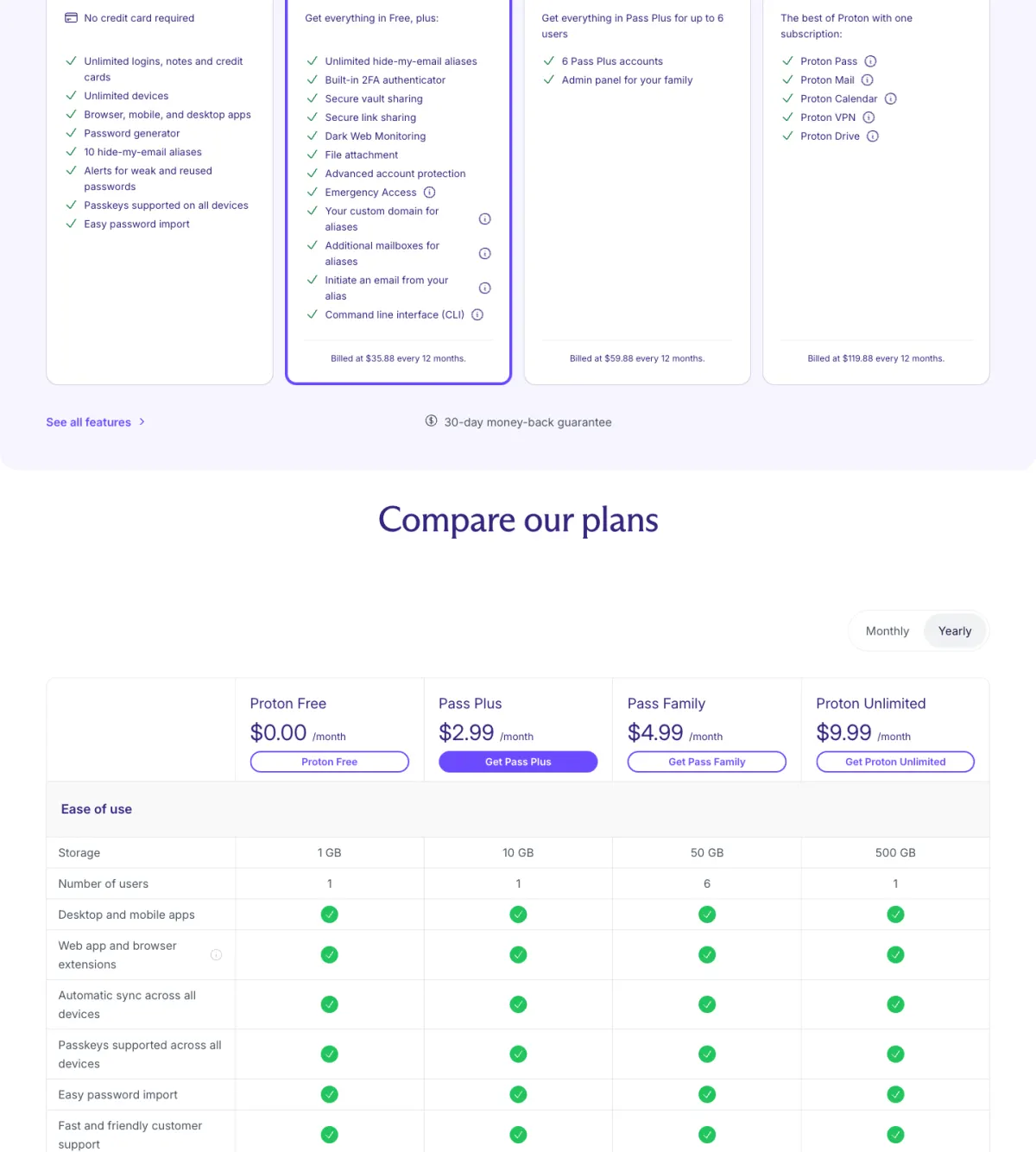
The options span a wide range, and you do not need to spend anything to start. At the free end sit the built-in managers in Chrome, Edge, Safari, and Firefox — better than reuse and fine for low-risk logins, though we dig into their limits in the companion piece on browser password manager safety. At the dedicated end sit purpose-built managers, several of which — including NordPass and Proton Pass — offer free tiers of their own.
What paid tiers add is worth knowing even if you start free. Dedicated managers lead with zero-knowledge encryption, meaning the key to your vault never leaves your device and the provider itself cannot read your passwords, plus breach and dark-web monitoring that flags when one of your logins turns up in a leak. On cost, as of July 2026 the paid tiers run roughly $1.49 to $1.99 a month on longer plans — these figures are approximate, so check the vendor's own site before you commit. The right move if money is tight is simple: start with a free tier now, and upgrade when the monitoring and cross-device sync earn it.
So who genuinely needs one — and who does not?
Pros
- You reuse any password across more than one account — which is nearly everyone, and the single strongest reason to start.
- You have more accounts than you can assign a unique strong password to from memory (again, almost everyone).
- You want a quiet phishing check and breach alerts without changing how you browse.
- You are moving toward passkeys and want one vault that holds both passkeys and passwords during the transition.
Cons
- You already live entirely inside platform passkeys and a single-ecosystem keychain, for a very small number of accounts — genuinely rare, but possible.
- You have only one or two logins total and never reuse them — an edge case, not most people.
- You are unwilling to trust any vault and would rather memorize a handful of unique passwords — workable only at very small scale.
The honest read is that the "does not need one" column is short and narrow on purpose. The person who truly can skip a password manager is someone with very few accounts who is already all-in on platform passkeys and a single-ecosystem keychain — and that describes very few people. For everyone still juggling dozens of password logins across banks, shops, and services, the reuse problem is real and the manager is the clean fix.
Once you have decided you want one, the next question is which — and that is a separate job from this one. Start with our pick in the best password manager, read the direct comparison in NordPass vs Proton Pass, and if you are weighing the free browser vault against a dedicated app, are browser password managers safe in 2026? lays out that trade-off honestly. When you are ready to try a dedicated option, both leaders offer a free tier to begin with: check current NordPass plans or check current Proton Pass plans .