
We independently score every service with our Experience Index. We may earn a commission if you subscribe through links on this page — it never affects our scores or picks.
"Gaming VPN" is one of the most oversold phrases in the category, so let's set expectations before we spend a dollar. A VPN routes your traffic through an extra server, which means it can only ever add a small amount of latency, never subtract distance. What a VPN can genuinely do for gaming is narrower but real: sidestep an ISP that throttles or badly routes game traffic, hide your IP so nobody in a lobby can DDoS your router, let you connect to a region where a title launches early or is priced differently, and keep you safe on the shared Wi-Fi in a dorm, hotel, or coffee shop. This guide ranks the services that do those jobs well — and stays honest about the one they can't do.
What a gaming VPN actually does (and doesn't)
Start with the myth. Your ping is mostly a function of physical distance and the quality of the route between you and the game server. A VPN inserts an extra encrypted hop, so on a clean connection it makes latency slightly worse, not better. If a service tells you it will cut your ping to a nearby server, ignore it.
Now the real value. If your ISP throttles or poorly routes game traffic — something that happens more than providers admit during peak hours — a fast VPN can occasionally hand you a cleaner path than your default route, which feels like lower lag even though the VPN itself adds a hop. That's a situational win, not a guarantee. The clearer wins:
- DDoS exposure — in peer-to-peer lobbies and some older console titles an opponent can see your real IP; a VPN puts the provider's server in the line of fire instead of your router.
- Region-locking — connecting to a server abroad reaches an early launch, a regional price, or a title that hasn't rolled out locally.
- Public or campus Wi-Fi — a VPN encrypts your traffic on a network you don't control, timely heading into a back-to-school and fall-release season spent gaming from a dorm.
The best gaming VPNs compared
| Service | Monthly plan | Best long-term rate | Devices | Gaming angle |
|---|---|---|---|---|
| NordVPN | $14.99/mo (Basic) | 2-yr Basic ~$3.49/mo | 10 | Low-overhead NordLynx, Fire TV app, Threat Protection |
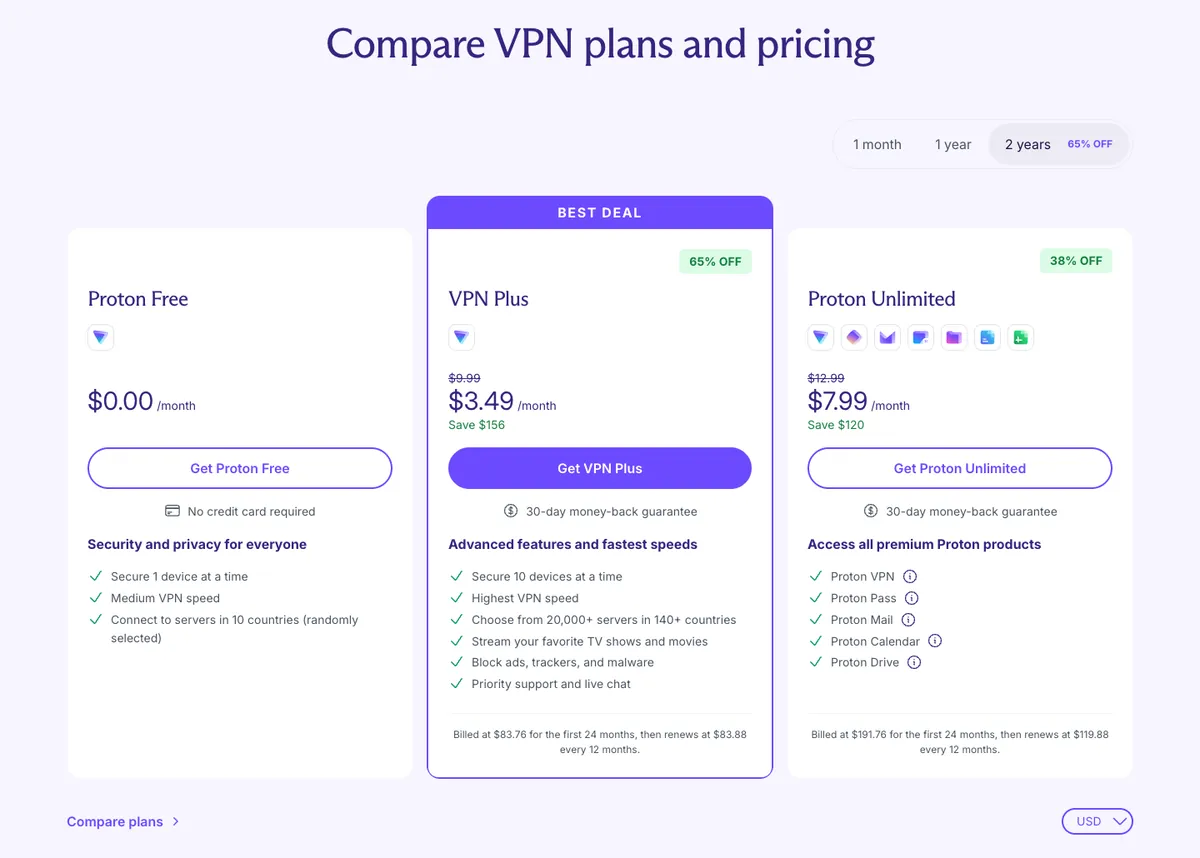
| Proton VPN | $9.99/mo (Plus) | 2-yr ~$3.49/mo (Plus); free tier available | 10 (Plus) | Privacy-first, free tier for light Wi-Fi use |
| ExpressVPN | $12.99–$19.99/mo (by tier) | 2-yr Basic ~$2.49/mo (higher tiers more) | 10–14 | Slick apps, Lightway protocol |
| Surfshark | ~$15.45/mo (Starter) | 2-yr Starter ~$2.49/mo | Unlimited | Cheapest long-term; unlimited devices |
ExpressVPN and Surfshark are the editorial anchors here, not our monetized picks — they're worth knowing about (Surfshark is the cheapest long-term option with unlimited devices; ExpressVPN has the slickest apps and its Lightway protocol), but our top-scored recommendations for gaming are NordVPN and Proton VPN below.
NordVPN — best all-around gaming VPN
NordVPN is the pick for most gamers because it does the boring things well. NordLynx, its protocol built on WireGuard, keeps overhead low, so the latency a VPN unavoidably adds stays as small as it reasonably can. That matters for latency-sensitive play more than any marketing checkbox.
The feature set lines up with real gaming needs:
- Threat Protection blocks ad, tracker, and malware domains at the DNS level.
- A server abroad helps with region-locked or early launches; hiding your home IP behind Nord's server reduces DDoS exposure in peer-to-peer lobbies.
- 10 simultaneous devices — enough for a PC, a console via a router or shared connection, a phone, and a couple of housemates.
- A genuine Fire TV / Amazon Appstore app, plus Meshnet for encrypted device-to-device tunnels (handy for reaching a home PC while traveling).
- A 30-day money-back guarantee — which is exactly how you should test speed and routing on your own connection before committing.
On price, the monthly plan is $14.99/mo and hard to justify; the value is the 2-year plan at roughly $3.49/mo on Basic. These are introductory rates that renew higher, so set a calendar reminder before renewal. One honesty note on Nord's past: a single third-party rented server was breached in 2018 (disclosed 2019) with no user logs taken, after which Nord moved to RAM-only servers, independent audits, and a public bug bounty — worth knowing, not a dealbreaker.
Get NordVPNNordVPN — Experience Index
6.0 / 10 composite
Updated Jul 5, 2026
| Dimension | Score | Consensus | Basis |
|---|---|---|---|
| Exit Ease | Moderate consensus | 30-day money-back guarantee on new subs only (renewals excluded); refunds via 24/7 live chat with self-serve refund button, processed in ~4h and paid in up to 10 business days; app-store/reseller buys excluded; auto-renew is opt-out by default and the subject of multiple 2024-2026 class-action lawsuits alleging buried cancellation, inadequate renewal notice, and dark patterns, with some users reporting refund push-back. | |
| Price Stability | High consensus | Intro discounts apply to first term only; renewal auto-charges at ~3x the intro monthly rate (Tom's Guide cites 287.63% increase, prices 'more than double'); auto-renewal on by default and disclosed but exact renewal figures buried on a separate legal page; renewals excluded from the 30-day refund; recurring Trustpilot/forum complaints of surprise renewal charges and two class-action suits (Aug 2024, May 2025) over auto-renewal practices. | |
| Account Sharing | High consensus | NordVPN allows 10 simultaneous connections per account on every plan, explicitly permits account sharing within families/household, supports unlimited devices via one router slot, and offers Meshnet to link up to 60 devices; experts call 10 reasonable but note rivals (Surfshark, PIA) offer unlimited; community is broadly positive on multi-device use though gripes center on billing not sharing. | |
| Multi-Device | High consensus | 10 simultaneous connections on one account; apps for Windows/macOS/Linux/iOS/Android plus browser extensions, routers (whole-network = 1 slot), smart TVs (Android TV/Fire TV/Chromecast) and consoles; Meshnet links up to 60 devices; limits are max 5 devices per single server and a 'Session Limit Reached' error past 10, with TechRadar flagging inconsistent feature parity across platforms and Trustpilot users citing frequent re-auth when switching devices. | |
| Customer Support | Moderate consensus | 24/7 live chat connects to a human in under ~1 minute (TechRadar/Tom's Guide/Engadget) plus 24-hour email and a searchable help center that Engadget flags as poorly organized/self-contradictory; community is mixed (Trustpilot ~4.1-4.2/5 over ~46k reviews calling support "very fast and helpful" but recurring auto-renewal/refund-delay complaints). |
Proton VPN — best value and the only free tier worth using
Proton VPN is the alternative for gamers who care about privacy or want a free option for light use. It's Swiss-based, its apps are open-source, and it publishes independent audits — a stronger privacy posture than most of the field. Plus covers 10 devices and includes Android TV / Fire TV apps.
The standout for students and travelers is the free tier: no data cap, one device, and servers in about 10 countries, with the honest limitation that it does not guarantee streaming unblocking and its shared free servers aren't built for competitive multiplayer. It's the one free VPN we'd recommend to anyone, because Proton's business model isn't monetizing your data — perfect for encrypting an occasional session on campus or hotel Wi-Fi without paying a cent. When you're ready to pay, Proton VPN Plus is $9.99/mo monthly, about $4.49/mo on a 1-year term, or about $3.49/mo on 2 years (verified on protonvpn.com 2026-08-20; introductory rates that renew higher).
Get Proton VPNProton VPN — Experience Index
7.1 / 10 composite
Updated Aug 21, 2026
| Dimension | Score | Consensus | Basis |
|---|---|---|---|
| Exit Ease | Moderate consensus | Official cancel page disables auto-renew immediately (clear, multi-platform) but refunds are prorated/unused-portion only and gated behind a manual support ticket; experts call cancellation frictionless yet refund proactive/manual; Trustpilot ~2.1-2.2/5 with recurring refund-denial/billing complaints. | |
| Price Stability | Moderate consensus | Tracked 2-year VPN Plus monthly-equivalent stepped up once across the tracked window, rising 16.7% to $3.49/mo as observed 2026-08-20; the same capture shows the 1-year term at $4.49/mo and month-to-month at $9.99/mo. Proton still discloses renewal inline on its own pricing page ("renews at $83.88 every 12 months" for Plus) alongside a 30-day money-back guarantee, so the structural issue remains the intro-to-renewal step rather than mid-term hikes on existing subscribers. Experts praise the upfront renewal disclosure while flagging the intro-vs-renewal gap and long-term plans above competitors; community (Trustpilot/YouTube) reports auto-renewal surprise charges and refund friction. | |
| Account Sharing | Moderate consensus | Official Proton pages and support docs confirm 10 simultaneous devices on paid plans (1 on free) and a Family plan of up to 6 separate accounts, each with 10 VPN connections, with no published anti-sharing enforcement; allowlisted reviews (Tom's Guide, TechRadar) corroborate the 10-device limit as generous but below unlimited-connection rivals; community signal (Trustpilot plus a 66-vote feature request) is thin and mixed, wanting lightweight in-account multi-user sharing. | |
| Multi-Device | Moderate consensus | Official docs confirm 10 simultaneous devices (1 on Free) plus unlimited router devices and very broad native-app coverage; allowlisted experts (Tom's Guide Apr 2026, TechRadar 2025, PCMag) confirm 10 connections and consistent, near-feature-parity apps across Windows/Mac/Linux/iOS/Android/TV; community (Trustpilot ~4.5, app stores 4.6-4.7) is positive on cross-device app experience with minor gripes about the 10-cap and support. | |
| Customer Support | High consensus | Official pages confirm 24/7 paid-only live chat, a deep Help Center, email and Zendesk ticketing, and no consumer phone; TechRadar (email <12h, chat ~9am-midnight CET) and Tom's Guide (extensive but technical docs, website-only/paid-only chat, slow-response complaints) corroborate; Trustpilot ~4.5/5 with recurring mixed support sentiment (helpful but slow). |
How to pick and set it up for gaming
Match the tool to the job. If you mostly want DDoS cover in peer-to-peer lobbies, region-locked launches, and a fast app across a household, NordVPN is the straightforward answer. If privacy is your priority, or you want a free tier to cover campus and public Wi-Fi without spending anything, Proton VPN is the better shape.
Whichever you pick, a couple of practical notes. Connect to the nearest server for anything latency-sensitive — a distant one only adds delay. Consoles usually need the VPN running at the router or shared through a PC, since most don't run VPN apps natively. And use the money-back window (Nord's 30 days) or Proton's free tier to test your connection to your games before you commit to a long term.
Pros
- NordLynx keeps the unavoidable latency a VPN adds as small as reasonably possible.
- Real DDoS-exposure reduction for peer-to-peer lobbies and older console titles.
- Reaches region-locked and early launches by connecting to a server abroad.
- Proton's free tier genuinely covers light protection on campus and public Wi-Fi.
Cons
- No VPN lowers ping to a physically closer server — expect a small latency cost, not a boost.
- The best prices require a multi-year commitment and renew higher afterward.
- Consoles typically need router-level or shared setup, not a native app.
- Free-tier servers aren't suited to competitive multiplayer.
Frequently asked questions
Does a gaming VPN reduce ping or lag?
Can a VPN protect me from DDoS attacks while gaming?
What is the best VPN for gaming in 2026?
Is a free VPN good enough for gaming?
Still weighing your options? Compare the whole field in our best VPN guide for 2026, read the deep-dive on our top pick in is NordVPN worth it, and if streaming is also on your list see the best VPN for streaming. Gaming without your own rig? Pair a VPN with one of the best cloud gaming services.